Amazon Redshift is now a warehouse source alongside Snowflake, BigQuery, Databricks, and ClickHouse. Connect it from
Settings → Integrations with a dedicated IAM user, then write a query and pick the object to sync contacts, events, or
your own custom objects on a schedule. Conversion reads through the Redshift Data API, so your cluster can stay private,
with no public endpoint or IP allowlist. Both Serverless workgroups and provisioned clusters work.
AI SQL generation, V2
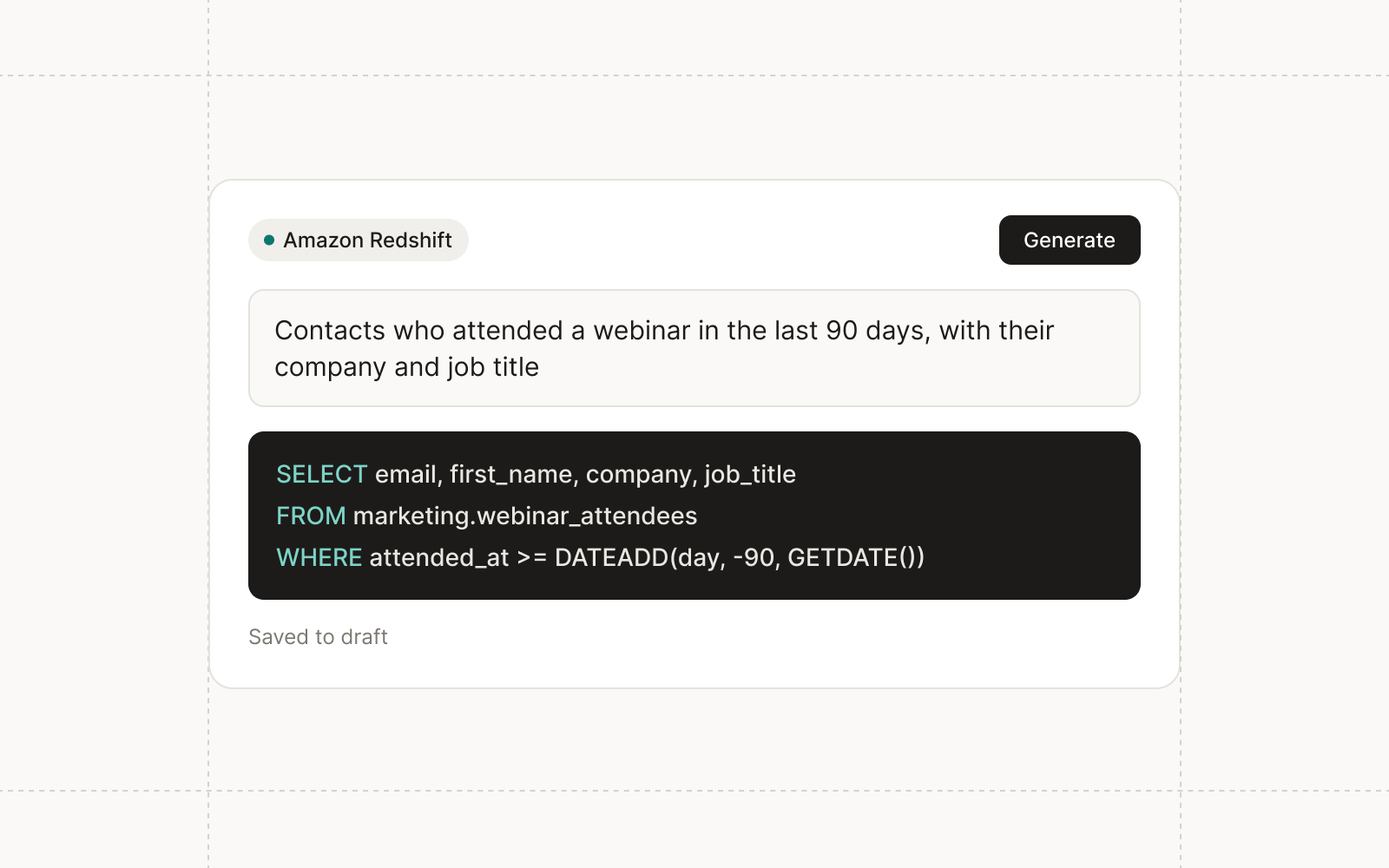
Conversion’s AI-to-SQL gets an upgrade, now built into the full-screen sync SQL editor for every warehouse. Describe the
records you want to sync, and the query lands in your sync’s draft with a summary of what it does and notes such as
“Every run reads all rows”. Undo restores your previous query, and nothing reaches the live sync until you publish the
draft. The generator writes in the dialect of the warehouse you chose, including the incremental filter for scheduled
syncs.
LinkedIn Ads: ad set tracking parameters
The LinkedIn Ads integration now covers ad set tracking parameters, so ad sets can be managed end to end from
Conversion. Edit URL tracking parameters, with custom or dynamic values, in a table with a one-line URL preview. Pushing
writes them to LinkedIn, and refresh reads back whatever was changed in Campaign Manager. Renaming a campaign, ad set,
or ad that’s already live writes to LinkedIn first, so a name never drifts between the two.
Custom object trash
Deleting a custom object now moves it to the trash instead of refusing when it has records. Its records and fields are
kept and reappear on restore, so an accidental delete is no longer a data loss.
Improvements
Agents Custom agents can search their own past sessions, the same way chats can search earlier conversations.
Agents Agents can list ads audiences and manage their additional members, the people uploaded only to an audience
to reach a platform’s minimum size. Adds and removals ask for approval.
CRM Sync Timeline entries in Conversion Connect link to the email, form, or campaign in Conversion.
Automations Workflow nodes and email sends that hit a temporary error keep retrying for about six hours, up from
about 77 minutes.
Fixes
Data Model Picklist options for fields whose values Conversion, Salesforce, or an event platform writes, such as
Original Traffic Channel and Opportunity Stage, can no longer be edited by hand.
Admin Okta SSO setup no longer fails when the certificate you paste contains extra whitespace.
Campaigns Campaign members sync under their webinar or field event instead of being left unresolved.
Audiences The audience creator no longer disappears when you switch browser tabs.
Data Model A contact’s Company Name saves correctly, and the venue on a field event can be updated.
Landing pages, emails, and forms can use any Google Font or your own uploaded brand fonts. Every font picker offers
three sources: system fonts, the full Google Fonts catalog, and the custom fonts your workspace uploads under Settings →
Fonts. Pick a font in a theme or on a single block, and set the fallbacks shown wherever it can’t load.
Upload WOFF2, WOFF, TTF, or OTF files up to 4 MB each, one per weight and style or a single variable font, and
Conversion reads each file’s weight and style. Gmail and Outlook don’t load web fonts, so email font selects flag Google
and custom fonts, and the email toolbar can preview the canvas with fallbacks only, the way those clients render it.
Luma registration questions
Answers to Luma registration forms can fill contact, company, and campaign member fields. Choose Manage fields on the
Luma row in Settings → Integrations to see every question, including your own, which appear as soon as a field event is
connected to a Luma event. Map a question to as many fields as you like, and choose whether its answers fill only empty
values or replace existing ones. Company, Job Title, and Phone Number come mapped by default.
Asana triggers for custom agents
Custom agents can start from Asana. A trigger fires when a task is added, updated, commented on, moved to a section, or
assigned to the agent, and can be filtered by project, section, tag, assignee, or completion. Each task gets one agent
session, and a new task waits until edits settle so the agent starts on the filled-in version.
The agent can read the task with its custom fields and attachments, comment on it, complete it, or move it to another
section. It only writes to the task that triggered it.
Landing page layout and form scripts
Rows have a Stretch option for vertical alignment, so cards in a row match the tallest one’s height. Forms on landing
pages accept the same set-values and submitted messages as embedded forms, so a script on the page can prefill
fields or react to a submission without an iframe. The submitted message now carries the form’s ID.
Improvements
Agents Agents can search your earlier chats, so a new chat can pick up a reference like the email you drafted last
week. Each person’s agent only sees their own chats.
Agents Agents can email workspace members, such as an alert to a rep. Messages are plain text from a no-reply
address, and the tool asks for approval by default.
Agents Agents can change Salesforce field sync settings for up to 100 fields at once, after your approval.
Email The section Mobile layout setting offers Side by side, Stack, and Stack in reverse, so text can sit above
its image on phones.
Email Tab accepts autocomplete suggestions and indents in the Liquid, HTML, and SQL editors, and Shift-Tab
outdents.
Data Model Contact warehouse syncs can write company fields when a column is aliased as __company__<field_key>.
API Public API requests can pass the API key in an api_key query parameter for tools that can’t set headers. The
X-API-Key header is still preferred.
API MCP clients can upload images, files, and contact CSVs from a public HTTPS URL.
Fixes
CRM Sync Failed Salesforce sync jobs retry automatically, and a permission error on one object no longer holds up
objects that don’t depend on it.
Admin Editors and Viewers can open campaign pages and use integration pickers, such as Slack channels and
Salesforce campaigns, without an access error.
Email Changing the subscription status of every contact that matches a filter runs as a background action, so
large updates finish reliably.
Agents The agent can build audiences that filter through linked records, such as custom objects.
Integrations LinkedIn lead gen leads include the ad’s name, not only its ID.
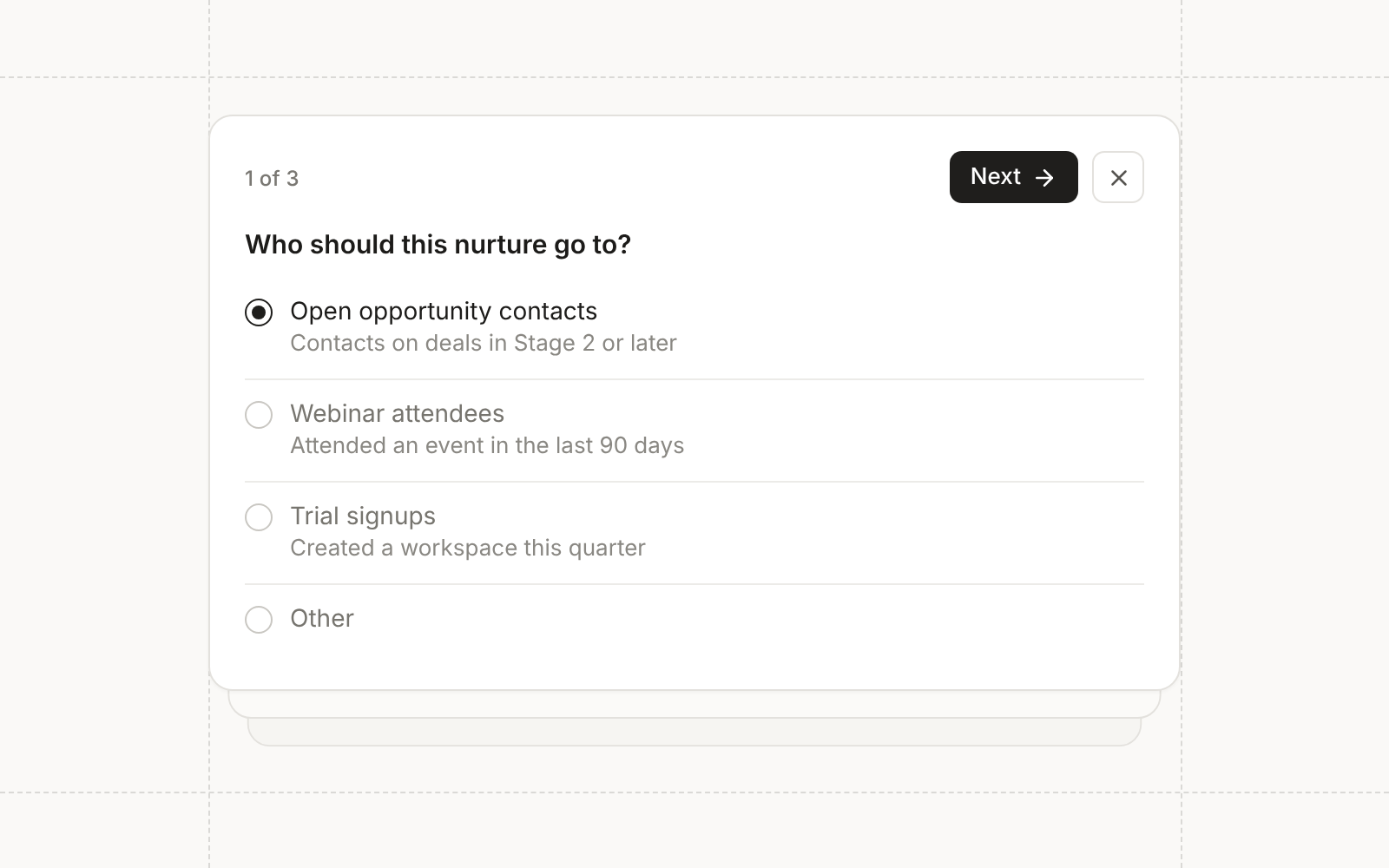
Interactive agents can now stop and ask before they act. When a request leaves a real decision open, the agent pauses
its turn and shows up to three related questions inline in the chat. Each question can be single choice, multiple
choice, or free text, and Other lets you type your own answer. Continue submits what you’ve answered and lets the agent
decide anything you left blank, so a skipped question never blocks the work.
Chat history in the sidebar
The agent chat sidebar has a history button that lists your recent chats with relative timestamps. Search by name to
find an older conversation and switch to it without leaving the page you’re on.
Unpublish landing pages
A live landing page can be taken offline from its page menu. Its URLs stop serving, and the draft and full version
history are kept, so you can publish again whenever you’re ready and pick up the version sequence where it left off.
Unpublishing needs the same permission as publishing, and it’s a lighter option than archiving a page you only need down
for a while.
Conditional fields on landing page forms
Forms on landing pages now follow the same conditional field logic as the form builder. A form stays hidden until the
first answer, fields appear and disappear as visitors complete earlier ones, and visibility is locked at submit so
nothing shifts mid-submission. The editor preview evaluates the rules too, so you can test them before publishing.
Defaults for new forms
Settings has a new Forms page with workspace defaults for new forms: create new contacts for new email addresses,
subscribe contacts automatically, and sync contacts to Salesforce. New forms of every type follow these defaults, and
any form can override them in its own settings. Managers can edit the defaults, and everyone else sees them read-only.
Export more through the public API
The public API has bulk exports for contact events, Conversion assets, and Mosaic touchpoints, so your warehouse can
read engagement and attribution history without a custom pipeline. The Fivetran connector reads the same exports, and
the email events export is now deprecated in favor of contact events.
Custom preference centers
Workspaces that manage subscriptions in their own preference center can send unsubscribe links there. Administrators
turn on Preference center under Email configuration and enter an HTTPS URL. The unsubscribe block and the
{{ unsubscribe_link }} token then point to that page on future sends, and turning the setting off restores
Conversion’s hosted link.
The URL can use Liquid with contact and company fields, tokens, conditionals, and details of the email being sent, such
as its topic, so your page opens on the right person and subscription. Conversion validates the URL when you save it and
keeps your query parameters exactly as written, without adding UTMs or click tracking. A link that renders as an invalid
URL stops that send instead of falling back to the hosted page. Changes people make on your page come back through your
synced fields, such as Salesforce, and don’t count toward a single email’s unsubscribe reporting.
Workspace token defaults
The Workspace page has a Tokens tab for default token values. An asset uses the value from its nearest folder or
campaign that sets the token, then falls back to the workspace default, so a value every campaign shares only needs to
be set once. Agents can set defaults too, subject to the approval you require for that tool.
Improvements
Agents Chat shows a card for landing pages, landing page themes, lead gen forms, duplicated workflows, new agents,
and lead score models the agent creates, linking straight to the new asset.
Agents Agents can sync contact imports into Salesforce on their own, still subject to the approval you require for
that tool.
Agents Agents can look up email senders and sending domains, and add a sender for a connected domain.
Email Scheduling a blast checks that it is ready to send, and once sending starts a blast can only be renamed.
Automations Workflows triggered by Meta and LinkedIn lead gen forms can read the lead ID and the campaign, ad set,
and ad the lead came from in Liquid, along with LinkedIn form hidden fields.
Data Model The fields list sorts by label, key, or fill rate, and field dialogs say Key instead of Name.
CRM Sync Contact, company, opportunity, and Salesforce-linked custom object record menus have a View sync logs
option that opens the sync history for that record.
CRM Sync Optional default Salesforce field mappings, such as Campaign Name, can be linked to other Conversion
fields. Required mappings like Email stay locked.
CRM Sync While a sync is running, its status pill reads Running instead of showing the time since the last
successful sync.
API Batch contact upserts accept a userId, so integrations can match and update contacts by their own IDs, even
without an email.
Admin Cloning or duplicating an asset lets you choose the destination folder.
Admin Asset headers show the full folder path.
Fixes
Agents The agent writes Liquid in the Liquid editor instead of pasting it into the message.
Email Campaign member fields in Liquid resolve in emails inside webinars and field events instead of using their
fallbacks.
Campaigns A new Salesforce campaign created for a webinar is named after the webinar’s name in Conversion, not the
provider’s event title.
Integrations A Webflow sync that stalled no longer gets stuck.
Integrations Contacts created from Zoom and Sequel registrations get the registrant’s first and last name.
Integrations Sequel registrations keep syncing more than 90 days after connecting.
Integrations Wistia webinars sync with the correct start time and duration. Use Re-sync on webinars bound before
this fix to correct them.
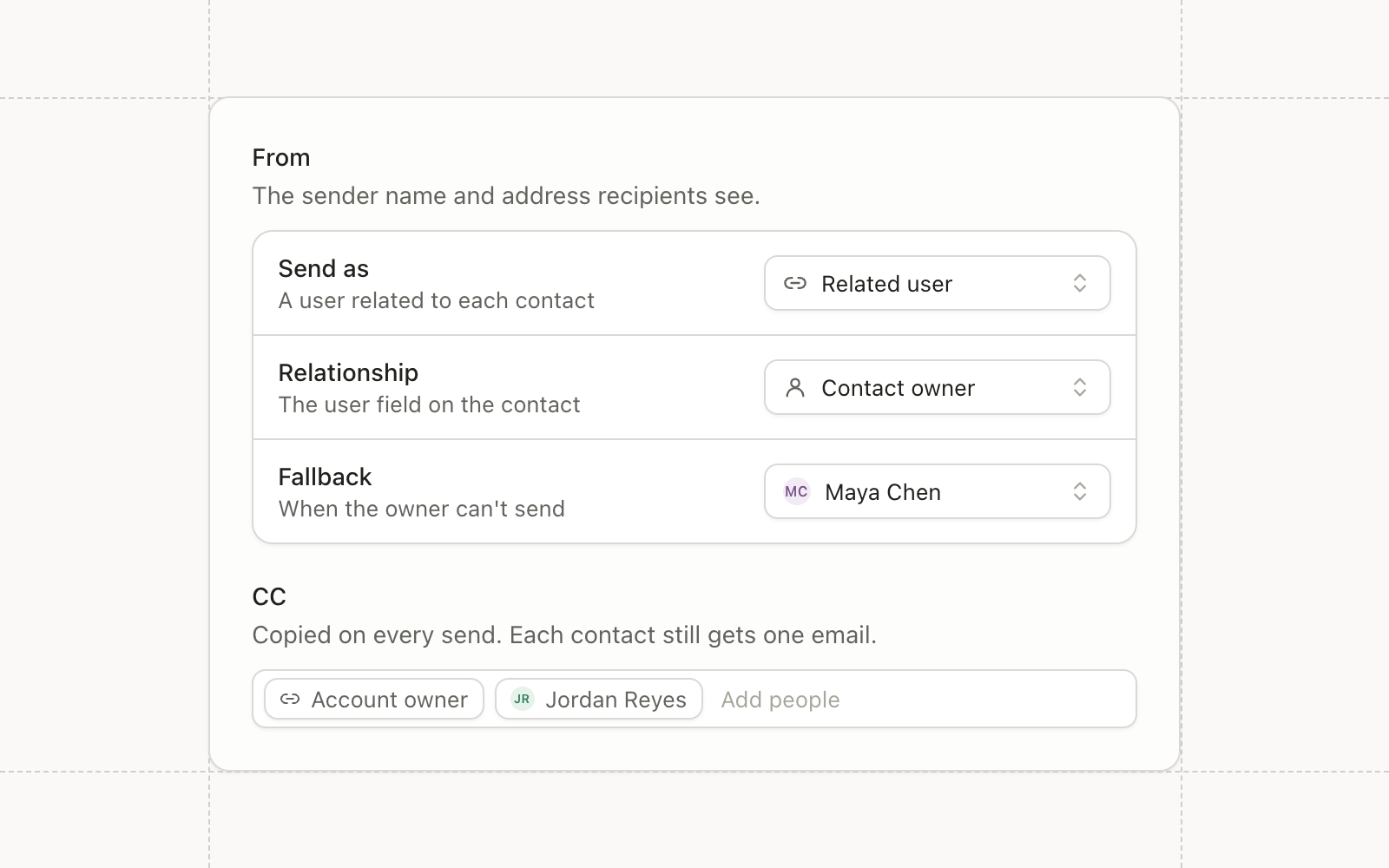
Blasts and workflow emails can send from a User in your CRM now. From and Reply to each offer three choices: a
configured sender address, a specific User, or the contact’s own user through a relationship like Owner.
When the contact’s user can’t be used, such as a queue or an inactive User, the email falls back to a sender or User you
choose. The preview shows the From and Reply to a live send would use for any contact you select, and why a User was
skipped. Publishing stops a From whose domain isn’t connected, so a sender that could never deliver is caught before
anything goes out. The sending User is available in Liquid as sender, so the signature can carry the rep’s name.
CC your team on each send
Blasts and workflow emails can copy workspace members, specific Users, or the contact’s user, with the same fallbacks.
Each contact still gets one message, with them in To and your team in CC. An address that can’t be used is skipped
without blocking the send, a bounce from a CC address never changes the contact’s status, and test sends never CC
anyone.
Workflow email alerts reach CRM Users the same way: the contact’s user with a fallback, or a specific User.
Wistia webinars
Wistia joins Sequel.io, Goldcast, and Zoom as a webinar provider. Connect it from settings with an API token, then bind
a Conversion webinar to a Wistia webinar. Members moved to Registered, by hand or by a workflow, are registered on
Wistia and get their personal join link. Sign-ups on Wistia’s own page come in daily, and attendance syncs within about
an hour and a half of the session ending, with watch time on each attendee.
Picklist fields
Picklist is a new field type with a defined list of options. Create one, reorder or deactivate options, or convert an
existing text field. Link a picklist to a Salesforce picklist and its options stay in sync with Salesforce, and filters
on it offer the options directly instead of a free-text box.
Warehouse sync drafts and versions
Warehouse syncs have drafts. Edit a sync, publish when it’s ready, and look back through every published version, so a
half-finished change never touches the sync that’s running.
Improvements
Automations The Update topic subscription node subscribes or unsubscribes a contact from specific topics without
touching their overall subscription status.
Email Magic blocks can pick content with ordered filter conditions. Each contact gets the first variant they
match, and any variant can hide the block.
Email Turning on the Operational setting asks for confirmation, since operational emails skip communication limits
and reach unsubscribed contacts.
Email Recipient exports appear in Settings with your other exports, with a Not Sent Reason column.
Audiences Filter counts reflect the list you’re narrowing, so an audience members table reads “312 of 4,210
members” and a workflow branch counts the contacts on its path.
Audiences Custom event data can be filtered in audiences as well as workflow triggers, and text comparisons ignore
case in both.
Campaigns A campaign status can carry several meanings, blasts get their own status meanings, and custom campaigns
open on an Overview tab with their details, Salesforce connection, and recent assets.
Data Model Relationship fields are available in every workspace, including relationships from contacts, companies,
and opportunities to Users and Groups.
CRM Sync The sync overview shows exact counts of what would sync before you turn an object on.
Reporting The attribution overview shows top tables by goal date or touch date.
Agents Chat defaults to a higher reasoning effort.
Fixes
CRM Sync When several contacts share an email, form fills and other lookups use the Salesforce-linked contact
instead of an unlinked duplicate.
CRM Sync New contacts link to an existing Salesforce Account even when its website is stored with www or https.
Integrations Zoom Events webinars appear in the bind picker for accounts that only use Zoom Events.
Campaigns Duplicating a campaign that contains a trashed folder no longer fails.
Agents Large images no longer break agent chat history.
The Conversion Slack app can be invited to a channel with /invite @Conversion, tagged in a thread, or messaged
directly. It uses the thread and your workspace as context.
For example, post a webinar registrant CSV in a thread and ask for an audience. It merges duplicates, sets aside
personal emails, excludes current customers on request, and replies with what it imported. Other channel members can
continue the request in the same thread.
Channel context and reactions
When tagged, it can read recent messages in the channel. When it needs a decision, it asks with emoji options and adds
the reactions, so a teammate can answer with one click. A working status shows while it handles a request.
Improvements
Agents Slack reactions are added in a fixed order, so the options read the same way every time.
Agents The working status clears when an agent’s turn stops, instead of lingering on the thread.
Integrations Slack channel pickers accept a pasted channel link as well as an ID, and explain how to invite the
app to private channels.
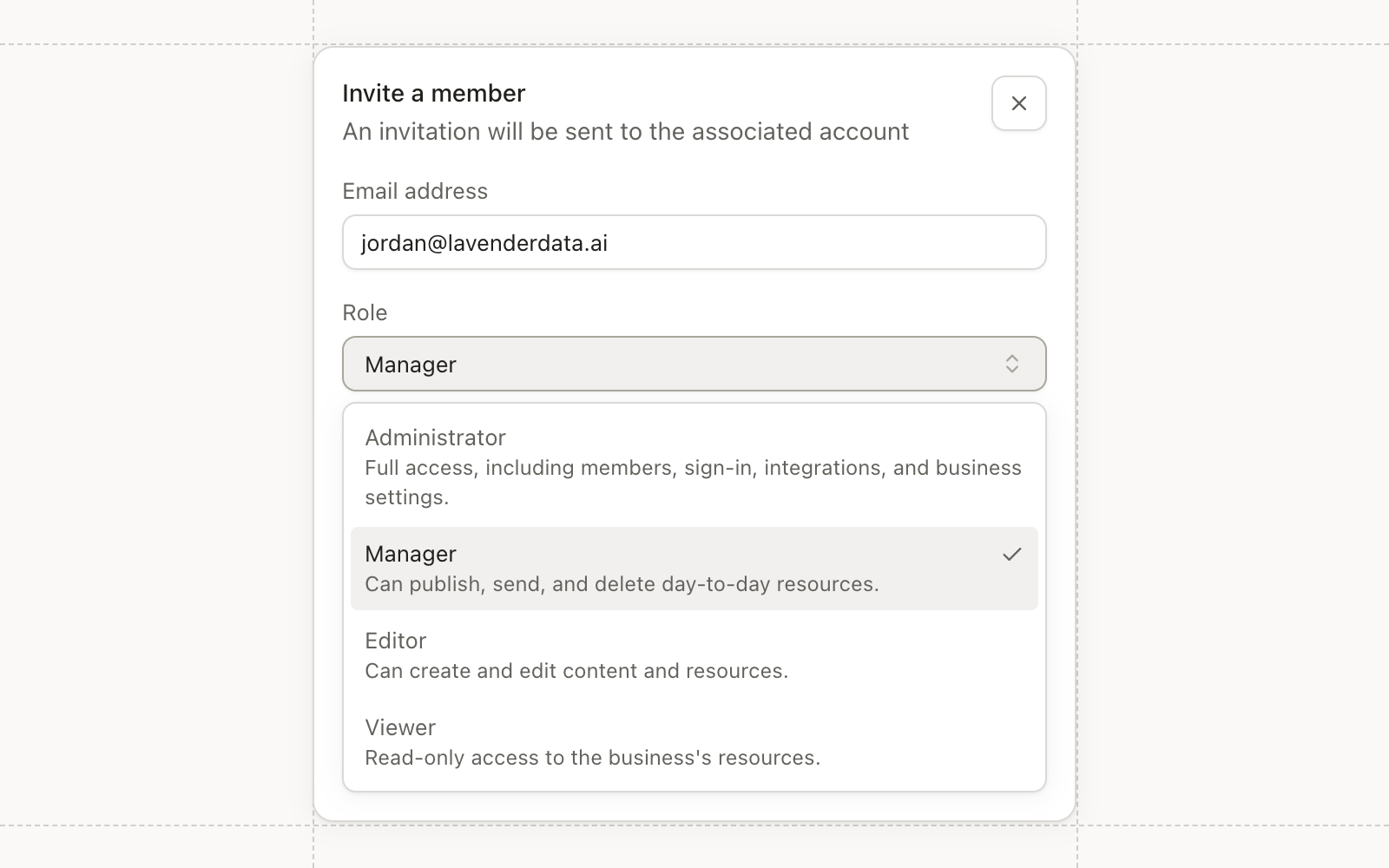
Workspace members now have four roles instead of two: Administrator, Manager, Editor, and Viewer. Each role includes
everything below it.
Viewers can see the workspace. Editors create and edit assets. Managers can also delete, send blasts, publish, and
activate workflows. Administrators manage members, teams, sign-in, integrations, and API keys.
Pause Salesforce sync, and keep records out
Administrators can pause reading from Salesforce in syncing settings and turn it back on later. While paused, Conversion
keeps writing to Salesforce and stops reading from it, and the confirmation dialog says so.
Each object’s settings list every Salesforce object it links to. Pick a checkbox field on any of them, such as Do Not
Sync, and records with that box checked stay out of sync in both directions.
Databricks
Databricks connects from settings with a service principal. Browse your Unity Catalog tables and views in the SQL
editor, build the query, and sync contacts, custom objects, and events on a schedule, the same way you would from
Snowflake or BigQuery.
Users and Queues
New Users and Queues pages in settings list your synced Salesforce users and queues, with how many contacts each one
owns. Assign Owner and Sync Contact nodes can pick an owner directly: the integration user, a user, or a queue.
Improvements
Admin Security settings show sign-in methods in one place. Add or change a password and link Google, and if your
workspace uses SSO you can see whether this session signed in through it.
Admin SSO, MFA, and SAML changes are limited to Administrators, and passwords get a length requirement and a
warning when one appears in a known breach.
Admin New assets can be created at the workspace root, and Administrators can set a default folder for new assets.
Automations Campaign member nodes can target field events, so a workflow can add a contact to a dinner, set their
status, or remove them.
Automations The Update subscription status node offers Unsubscribed alongside Subscribed and no status.
Reporting Attribution Channels, Campaigns, and Overview tables split by goal, and the campaign class view has a No
Campaign row so totals reconcile.
Integrations Contacts registered in Conversion for a Zoom Events webinar get their Zoom Events ticket and
confirmation email.
Integrations Attentive events match contacts by email or phone in a set order, across phone formats.
Email Email domain DNS records open in a wide dialog with every value in full and a Copy all button.
Fixes
Automations Duplicate source events no longer start duplicate workflow runs.
Email The View in browser link in sent emails opens the email for recipients.
CRM Sync The Salesforce error for a campaign that is already linked names the record that holds it.
Agents A new agent chat stays visible while its session starts.
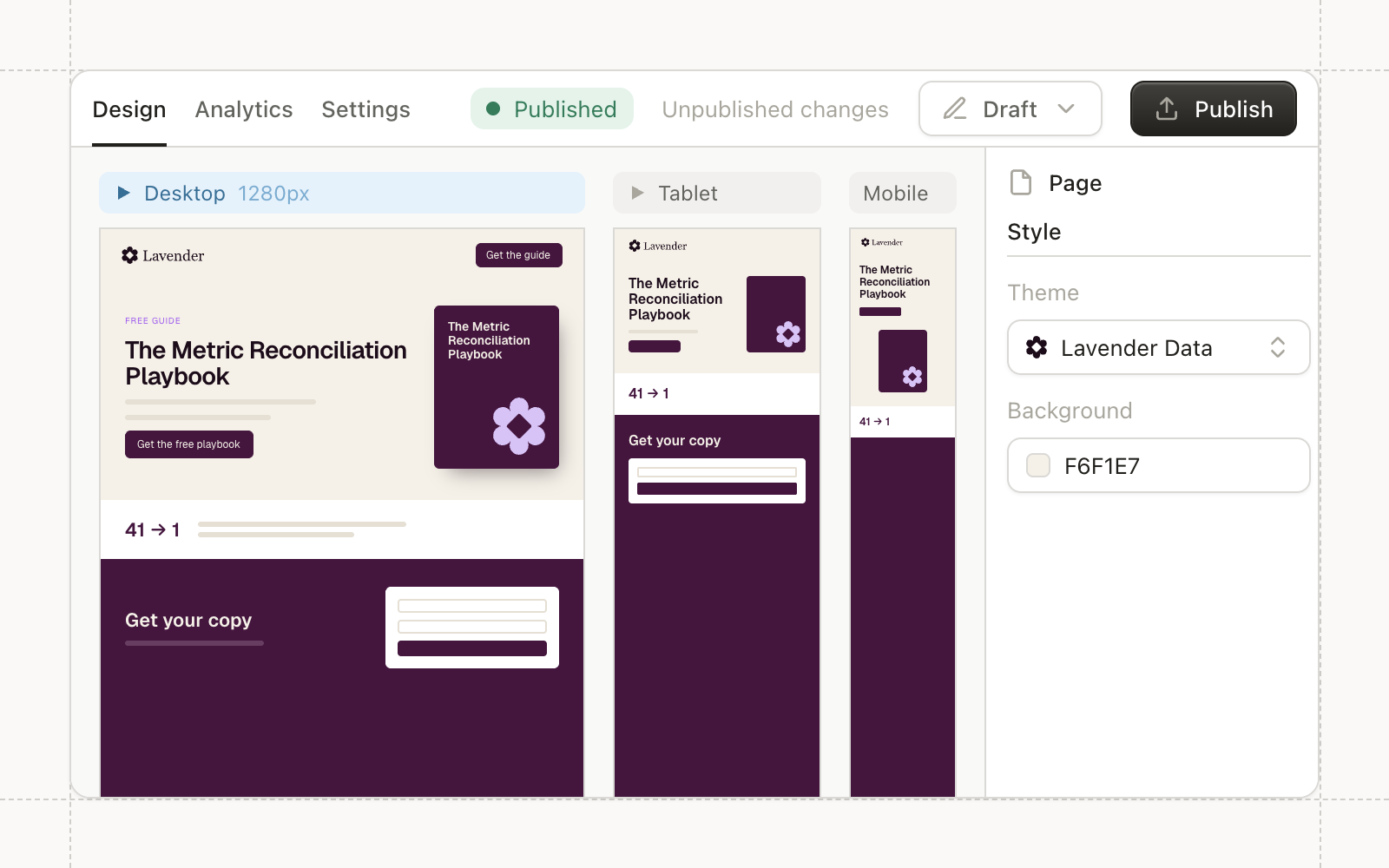
The landing page editor has been rebuilt. Each page opens on Design, with Analytics and Settings as their own tabs
instead of one crowded overview. Variants can split on any dimension, text styling and typography controls are expanded,
and multiple elements can be selected and edited together.
Pages personalize on load. CRM fields, tokens, and Liquid fill in for a visitor Conversion recognizes.
Analytics
The Analytics tab has a date range, filters for URL and version, and a Performance card where you pick the stat tiles,
including conversion rate, with a daily trend underneath.
Themes and your own domain
Landing page themes live in Settings with a full editor, autosave, publishing, and version history. Custom URLs live on
the Settings tab, certificates are issued automatically, and every page redirects to HTTPS.
Agents can build pages
Agents can create and edit landing pages and themes. Pages and themes an agent creates are saved as drafts for review.
Improvements
Campaigns Landing pages and themes live in folders with the rest of your assets, and deleted ones go to the trash.
Conversion is listed in ChatGPT’s app directory and in Claude’s connector directory. Cursor and other clients that
support remote MCP servers connect by URL.
OAuth sign-in
The server authenticates with OAuth instead of a workspace API key. On first connect, sign in to Conversion, choose a
business, and authorize the client. Each connection is scoped to one business and one user, and actions run with that
user’s role and permissions.
Shared tools with Conversion AI
The MCP server uses the same tools as Conversion AI in the app, including workspace search, audiences, workflows,
emails, landing pages, reporting, and Files and Media. Workspace feature settings apply to MCP the same way they apply
to chat. Confirmation before a write is handled by the client’s approval settings.
Setup
In Claude, go to Settings, then Connectors, and search for Conversion. In ChatGPT, search Apps for Conversion. In other
clients, add https://mcp.conversion.ai/mcp as a remote server.
Improvements
Agents Agents can connect to external MCP servers, with setup guides for HubSpot, Marketo, Pardot, Iterable, and
GitHub.
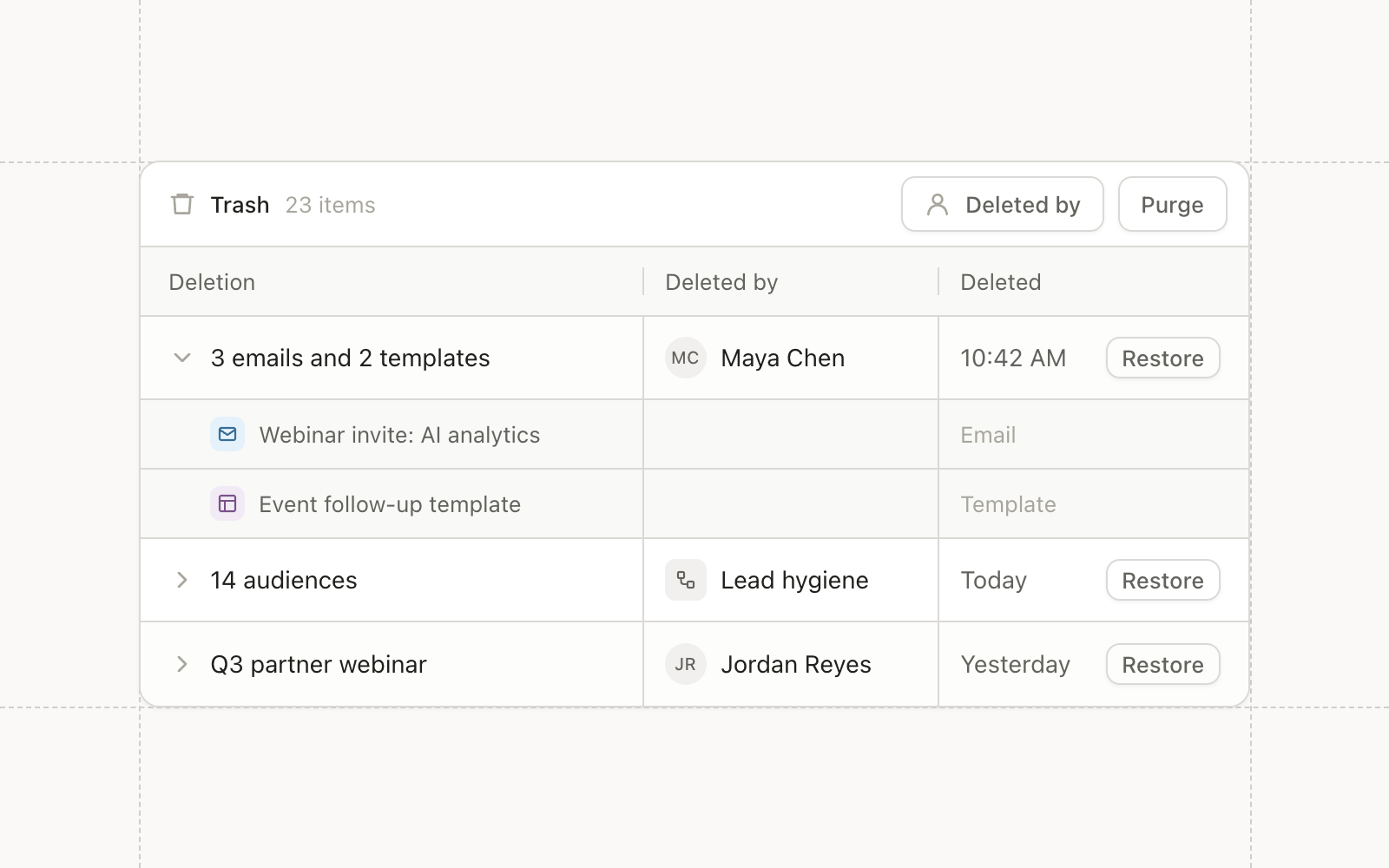
Deleted audiences and custom campaigns now move to the trash instead of disappearing. The trash lists deletions grouped
by the request that made them, so removing three emails and two templates in one action reads as two rows rather than a
scatter of single items. Deletions by workflows and other non-user actors are grouped by day and type.
You can filter the trash by who deleted something, see how much is in it, and purge items manually.
Compare attribution to another period
The attribution overview can now be compared against a second period. By default it compares to the equal-length range
just before, and the summary and charts return both periods together so the page does not wait on a second load.
Attribution channels also carry colors, and the default channels ship with a palette, so a channel looks the same on
every chart it appears in.
Call Agent workflow node
A new workflow node starts an agent session as a step. A workflow can hand a record to an agent for research or drafting
and continue once the agent has acted.
Improvements
Reporting Campaigns can be grouped by class, so a CRM campaign, a blast, and an ad campaign with similar names
stay separate rows in attribution.
Campaigns Field event attendance appears on the contact timeline with the event’s name and a link to it.
Integrations Zoom Events webinars can be bound to a Conversion webinar, and registrants and attendance sync the
same way they do for Goldcast.
Data Model CSV imports can name the field used to look up a related record, and CSV exports can write a field of
the related record, such as a user’s email or a queue’s name, instead of its ID.
Agents Agents can update campaign fields in bulk, and chat has an effort picker for how hard an agent works on a
request.
Admin Resetting a password invalidates every outstanding reset link, the account page offers a one-click sign out
of all other sessions, and passkeys show when they were last used.
Fixes
Audiences A static audience created with a filter is now populated with the matching contacts.
Audiences Audience refresh jobs are labeled “Refresh Audience”.
Campaigns Field events can be duplicated, on their own or inside a duplicated folder.
Integrations Slack channel IDs are parsed more reliably, with clearer errors when one is not valid.
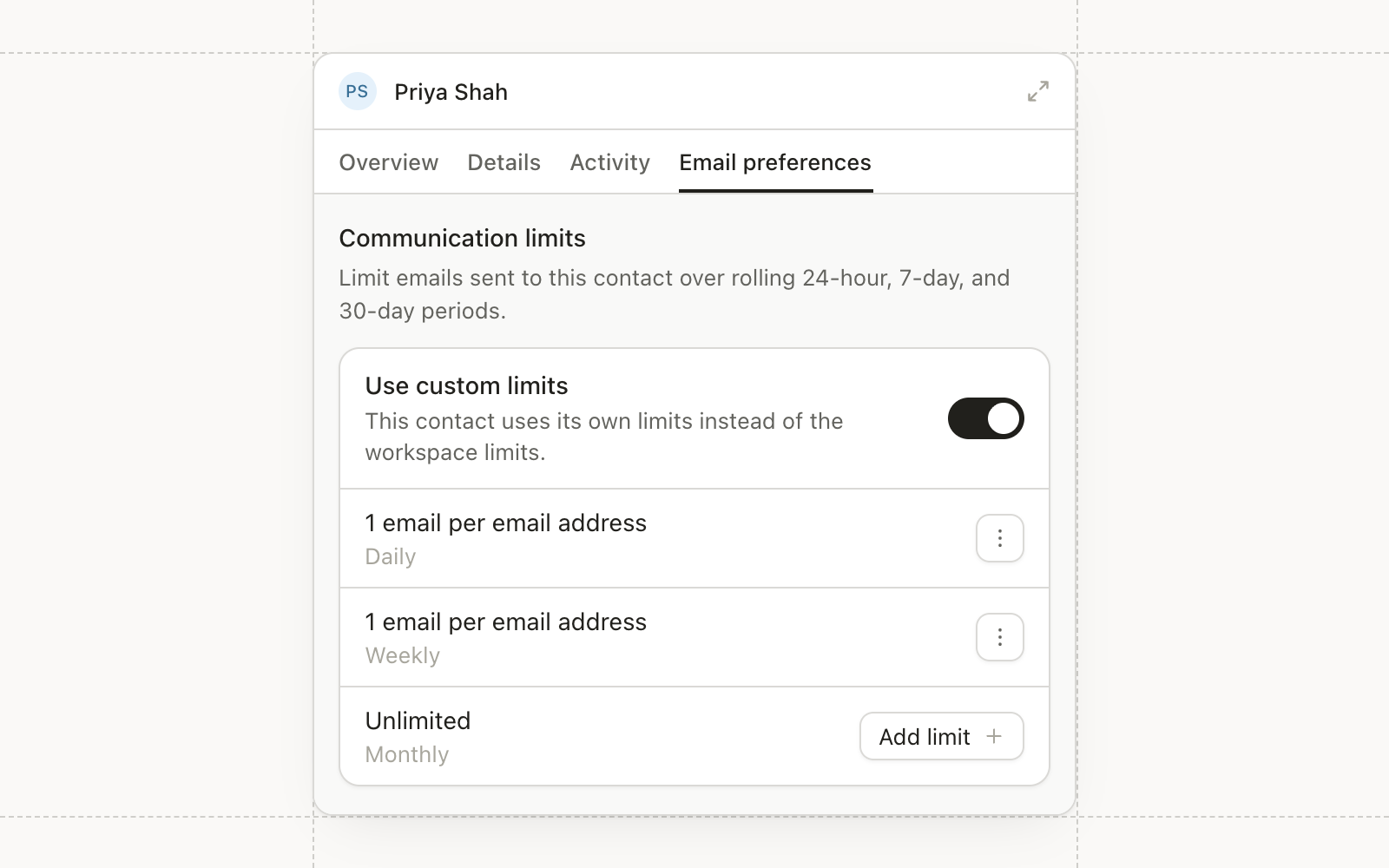
Contacts have a new Email preferences tab where admins can set daily, weekly, and monthly email limits. Custom limits
replace the workspace limits for that contact only.
Contacts without custom limits keep following the workspace limits.
Set limits from a workflow
The new Update communication limits node sets or clears a contact’s limits as part of an automation. For example, a
workflow can tighten limits when a deal reaches a late stage and clear them when it closes.
One trigger editor for campaigns
Campaign triggers and campaign conditions in workflows now share one editor for scope and status, so they behave the
same wherever you set them. You can select more than one campaign type at once, and field events are included.
A Fields tab on webinars and custom campaigns
Webinars and custom campaigns have a Fields tab for their campaign field values, and those fields now sync with the
Salesforce Campaign object. Webinar details read from the same fields, so an edit there is what workflows and reports
see.
Improvements
Agents Agents and MCP clients can update campaign field values, and the approval screen shows each field’s before
and after.
Agents Agents can edit field event campaigns and form field mappings.
Agents Last active on the Agents page reflects real session runs, with new Recently active and Oldest active
sorts.
Agents Long pasted text in the agent prompt becomes a text attachment instead of flooding the message box.
Agents Slack shows a working status while an agent handles an @-mention or a reply in its thread.
Automations A failed Sync to Salesforce node shows Salesforce’s rejection reason on the run page.
Automations Email open and click triggers can filter clicks by the link URL, and have an Include bot events
switch.
Forms New contacts from forms and lead gen submissions get a company website filled in from their work email
domain.
Forms Single checkbox fields have a Checked by default option.
Campaigns New workspaces start with a Custom campaign type with Sent and Responded statuses.
API Contact batch upserts accept an audience ID, and a new endpoint removes contacts from an audience without
deleting them, so Hightouch syncs can add and remove members.
API MCP tools accept arguments from clients that send them as JSON strings.
CRM Sync Salesforce can be reconnected from settings, with sandboxes detected automatically.
Fixes
Forms The LinkedIn and Meta lead form pickers list every form instead of stopping partway through a long list.
Admin The Squarespace publishing preference no longer resets to Manual.
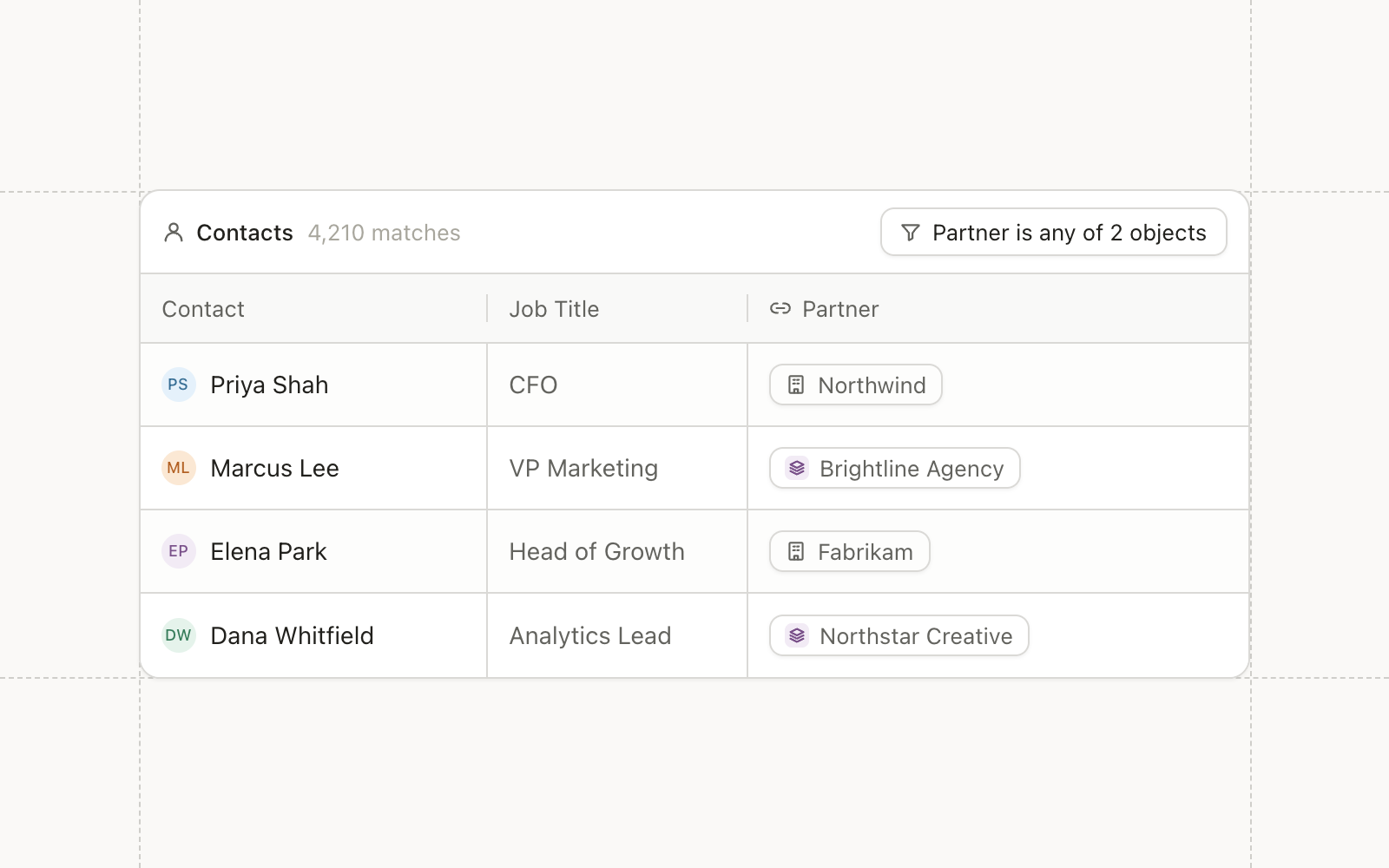
A relationship field can now point at more than one object type at once. A Partner field can link to a company or to a
custom Agency object, and comparisons and paths on that field work in segments, filters, and table cells.
For now you create these fields from the source side.
Contact erasure in the public API
A new full-delete endpoint erases a contact and suppresses its identifiers, to support GDPR and CCPA requests. The docs
have a new Data and Privacy section to go with it.
Clearer Salesforce sync logs
Sync logs leave out fields that didn’t change, and a skipped Salesforce update says why each field was skipped.
Improvements
Agents AI chat accepts several pasted images at once, and agents read a contact’s full event history instead of
the latest 50 events.
Agents Agents can create email topics, move webinars into folders, and upload and manage files in Files and Media.
Agents Every Liquid editor has a Generate Liquid with AI box, and generated Liquid is validated before it replaces
what’s in the editor.
Email The deliverability card measures against emails sent rather than recipients, with the reasons emails were
not sent tucked into a collapsed footer.
Email Knak assets named with a WORKFLOW marker create workflow emails instead of draft blasts.
Forms The default email field is named Email instead of Untitled email.
CRM Sync Syncing external Salesforce fields works for custom objects.
Campaigns Deleting a campaign type asks first, and is blocked while campaigns still use it.
API Public API errors return real HTTP status codes and the documented error body instead of HTTP 200 with an
internal code.
Reporting Blast click attribution no longer depends on the campaign membership toggle, and journey queries are
faster.
Fixes
Agents AI chats no longer fail when many images are uploaded.
CRM Sync Opening a contact whose Owner field isn’t a Salesforce user ID no longer errors, and contacts converted
from leads no longer keep stale Salesforce IDs.
Email Malformed unsubscribe links return a client error instead of a server error.